Why APIs Over Database For Data Transfer
Due to privacy and compliance concerns, analytics platforms often require data migration between different environments, but network partitions and database complexities can make this process extremely challenging. This article explores the development of an automated dashboard migration tool for a business intelligence platform that transformed a manual 2-day process into a 20-minute automated workflow.
The Challenge
The target platform, a business intelligence system, uses Helm for deploying private and public instances across different network environments. The architecture created a significant operational challenge: migrating dashboards between instances required manual processes that were time-consuming, error-prone, and technically demanding.
The traditional approach involved direct database operations, which presented several critical issues. High-privilege database access increased security risks and the potential for data corruption. Unique key duplications and table definition mismatches between different environments caused frequent migration failures. Most significantly, the complex nested dependencies between dashboard metadata made manual migration extremely difficult to execute correctly.
Each dashboard migration required approximately 2 person-days of manual work, involving database exports, dependency resolution, and careful data transformation. With multiple environments and frequent deployment cycles, this manual process became a major bottleneck for operations teams.
Solution Architecture
The solution leveraged OpenAPI endpoints instead of direct database access, providing a more robust and maintainable approach to data migration. This API-driven strategy eliminated the need for elevated database privileges while providing better version compatibility and cleaner dependency management.
Python was chosen as the implementation language for its excellent API handling capabilities and rich ecosystem of data processing libraries. The tool was designed with a modular architecture that separated concerns and maintained clear dependencies between components.
Core Components
The migration tool consists of several specialized components working together to provide a seamless migration experience.
Command Line Interface serves as the primary interaction layer, offering both interactive and automated modes. The interactive mode guides users through the migration process with prompts and confirmations, while automated mode supports batch operations using --import-all and --export-all flags for unattended processing.
Data Management Layer handles three critical aspects of the migration process. The configuration component manages environment settings for both source and target instances. File handling manages JSON dump files containing exported configurations and CSV files for dashboard selection. The secrets handling component provides encryption and decryption capabilities for sensitive authentication data.
Export Flow Components orchestrate the dashboard extraction process. These components list available dashboards from the source instance, export dashboard configurations with all metadata, extract associated data sources, and export datasets along with their field definitions.
Import Flow Components handle the reverse process of creating dashboards in target instances. They import dashboard configurations, create dashboard instances in the target environment, establish data sources in the new instance, and create datasets with proper field mappings.
Utility Components provide essential supporting functionality. The Dashboard Parser component analyzes dashboard configurations and extracts data dependencies. The Dashboard Replacer handles ID mapping between different instances and updates references in configuration files. The OpenAPI Client component manages all API communication, including authentication and request handling.
Workflow
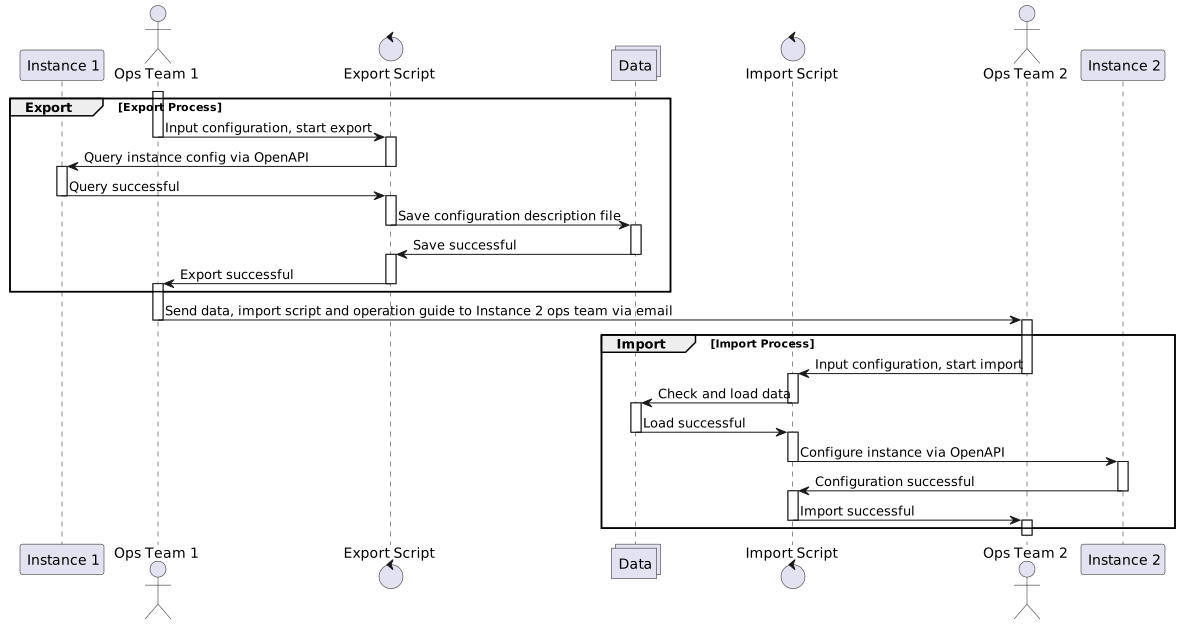
The migration process follows a structured sequence designed to maintain data integrity and handle complex dependencies effectively.
Export Process
The export workflow consists of five key steps that ensure complete data capture. The system first lists available dashboards from the source instance, allowing users to review and select specific dashboards for migration. Dashboard selection can be interactive or automated based on predefined criteria.
Selected dashboards are exported with their complete configurations, including layout definitions, widget settings, and styling information. The system then extracts data dependencies by analyzing dashboard configurations to identify required data sources and datasets. Finally, all related data sources and datasets are exported with their connection parameters and field definitions.
Import Process
The import workflow follows a dependency-first approach to ensure system consistency. The process begins by loading exported configurations and validating their integrity. Data sources are imported and validated first, establishing connectivity before any dashboard creation occurs.
Datasets are imported next with proper field mappings and schema validation. The system handles ID conflicts through mapping tables and reference updates. Dashboard references are updated to point to newly created data sources and datasets. Finally, dashboards are imported with full functionality restored in the target environment.
Deployment
The tool includes comprehensive deployment support for modern DevOps environments. A Dockerfile enables containerized deployment across different platforms, ensuring consistent execution regardless of the target environment. The solution requires Python 3.11 or above for optimal performance and security features.
All dependencies are managed through a comprehensive requirements.txt file, enabling reproducible deployments and simplified dependency management across different environments.
Implementation Details
The migration workflow follows a carefully orchestrated process designed to maintain data integrity and handle complex dependencies.
Export Process
The export process begins by connecting to the source analytics instance and retrieving a complete list of available dashboards. Users can interactively select which dashboards to migrate, or the tool can process all dashboards automatically in batch mode.
For each selected dashboard, the tool exports the complete configuration, including layout definitions, widget configurations, and styling information. The system then analyzes these configurations to identify all data dependencies, including data sources, datasets, and field definitions.
All related data sources are exported with their connection parameters and authentication settings. Dataset definitions are extracted along with their field schemas, data types, and transformation rules. This comprehensive approach ensures that migrated dashboards will have all necessary components available in the target environment.
Import Process
The import process follows a dependency-first approach to ensure proper system state. Data sources are imported and validated before any dashboard creation begins. This sequencing prevents orphaned dashboard references and ensures connectivity to data systems.
Datasets are created next, with proper field mappings and schema validation. The system handles ID conflicts by generating new unique identifiers and maintaining mapping tables for reference updates.
Dashboard configurations undergo transformation during import to update all internal references to newly created data sources and datasets. This reference updating ensures that migrated dashboards maintain full functionality in the target environment.
The process includes comprehensive validation at each stage, with rollback capabilities if errors occur during migration.
Technical Implementation
The tool was implemented with modern DevOps practices in mind. A Dockerfile enables containerized deployment across different environments, ensuring consistent execution regardless of the target platform. Python 3.11 provides the runtime environment, with all dependencies managed through a comprehensive requirements.txt file.
The modular design allows for easy maintenance and feature extension. Each component has clear interfaces and responsibilities, making the system easy to test and modify. Comprehensive logging provides detailed audit trails for troubleshooting and compliance requirements.
Error handling is built throughout the system, with graceful degradation and meaningful error messages to guide operators through resolution steps.
Results and Impact
The dashboard migration tool delivered significant operational improvements. Migration time decreased by approximately 650%, from 2 person-days per dashboard to just 0.2 person-days including manual adjustments and validation.
The automation eliminated human errors in the migration process, particularly around dependency resolution and ID mapping. This improvement increased migration success rates and reduced the need for rollback procedures.
Operational teams gained the ability to perform migrations during off-hours without requiring specialized database knowledge. The tool’s interactive mode provides guidance for less experienced operators, while automated mode enables integration with deployment pipelines.
The API-driven approach provided better compatibility across different platform versions, reducing the complexity of cross-environment migrations. This flexibility became particularly valuable as the platform evolved and different instances operated on varying software versions.
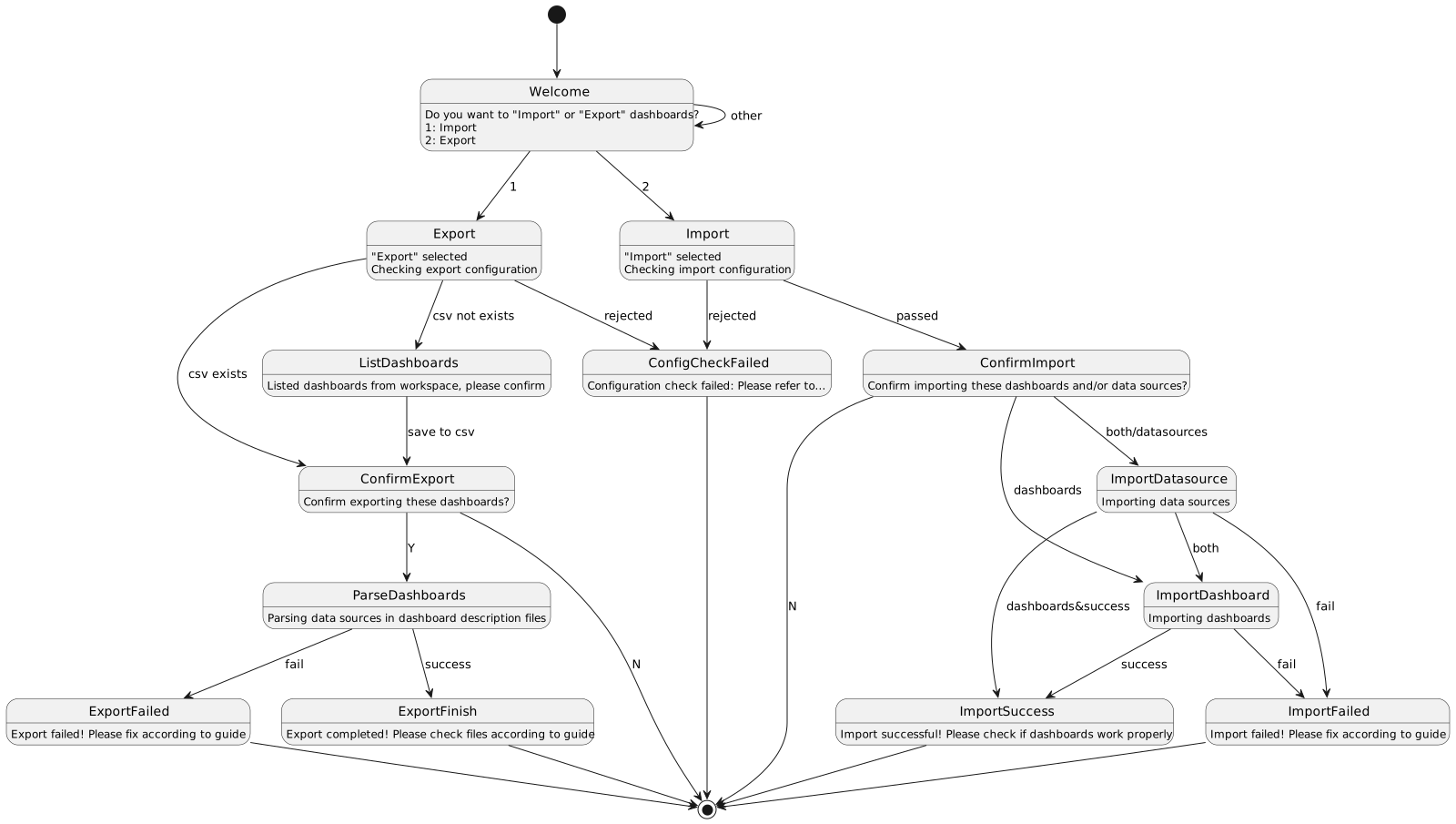
Workflow Visualization
The migration process follows a structured workflow that ensures data consistency and provides clear checkpoints for validation. The export phase involves configuration verification, dashboard selection, and comprehensive data extraction. The import phase handles dependency creation, reference updating, and final validation.
Each phase includes confirmation steps and provides detailed progress reporting. This transparency allows operators to understand the migration progress and intervene if necessary during the process.
Future Considerations
The success of this migration tool demonstrates the value of API-first approaches to system integration challenges. By avoiding direct database manipulation and leveraging existing API endpoints, the solution achieved better maintainability and reduced operational risk.
The modular architecture provides a foundation for additional features, such as cross-platform migrations, advanced conflict resolution, and integration with continuous deployment pipelines. The comprehensive logging and error handling create opportunities for further automation through machine learning approaches to common migration issues.
This project illustrates how thoughtful tool development can transform operational bottlenecks into streamlined processes, enabling teams to focus on higher-value activities while maintaining system reliability and data integrity.